Christmas Budget Planner App — picture 1
1 / 10
Money & Budgeting
4.8 shop rating · 32 reviews on Etsy

Christmas Budget Planner App

Know what is safe to spend before you buy

$29.00
  • No subscription
  • Instant access
Buy now

Secure checkout by Whop

  • Instant access
  • Pay once
  • Any device
  • 3 languages

You get: a PDF with your private app link and a quick-start guide.

  • VISA
  • Mastercard
  • Apple Pay
  • Google Pay
  • Crypto
About this appFeatures and what you get

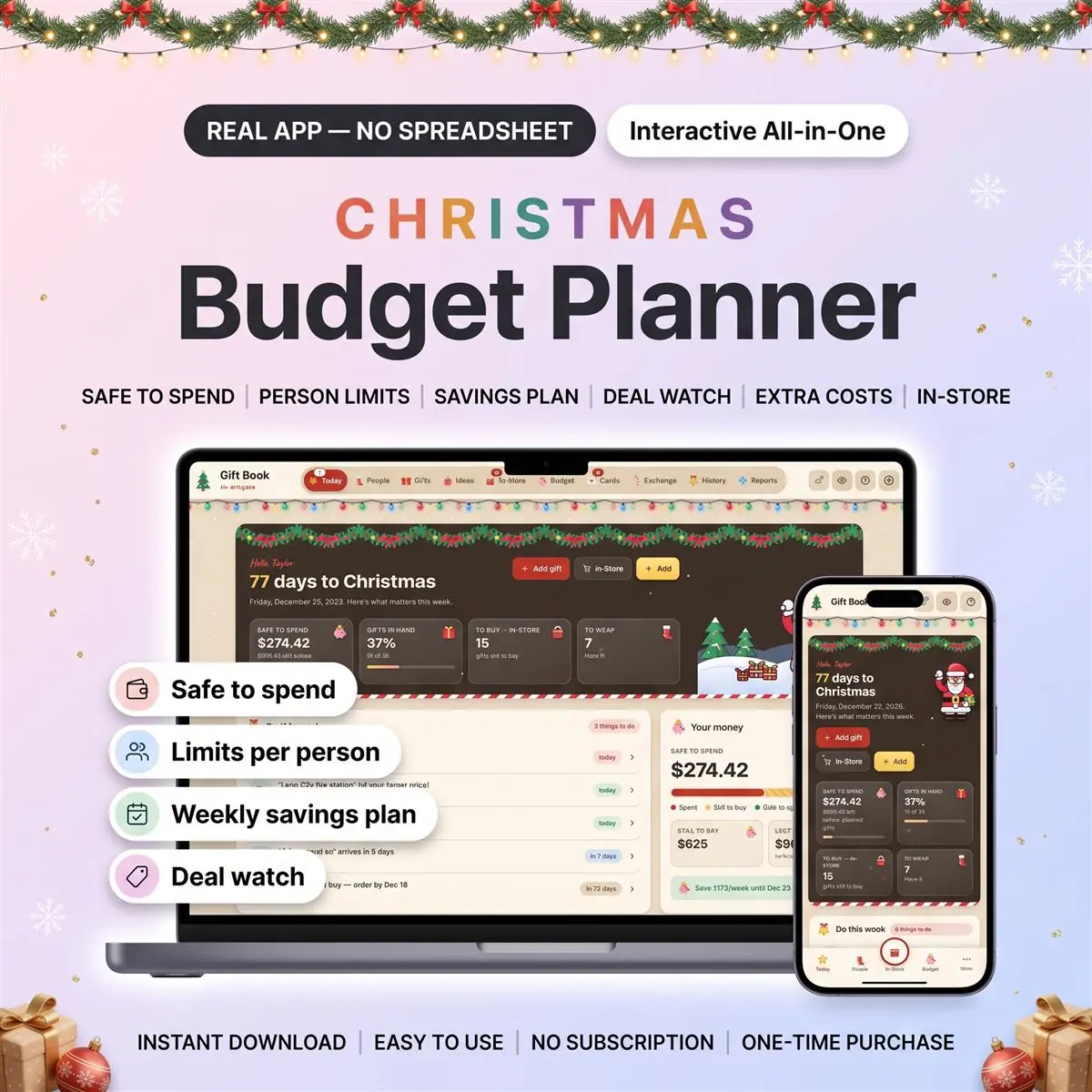
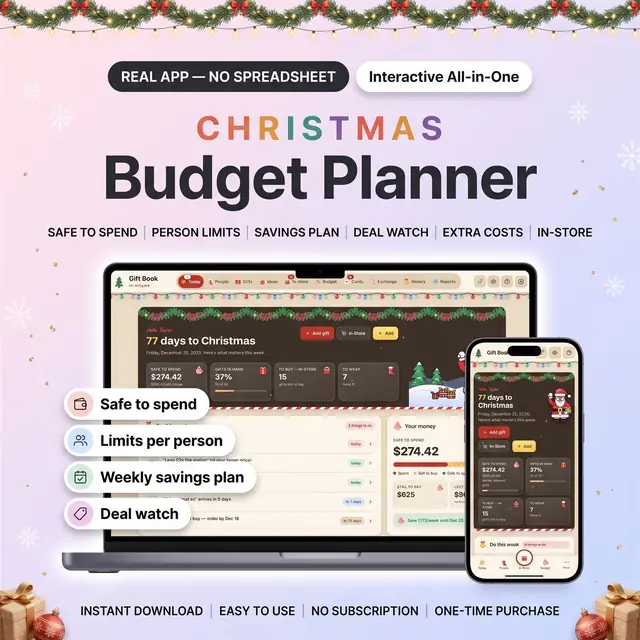
This Christmas budget planner is an interactive app that shows what's safe to spend before you buy, with a spending limit for each person on your list.

Set one holiday budget, and every gift price and extra cost you add counts toward it: spent, still planned and safe to spend, always in one place. It works as your Christmas budget tracker on your phone while you shop, and it tells you how much to put aside each week until your gift day.

It's a web app that opens in your browser. Not a spreadsheet and not printable planner pages: no formulas to fix, no cells to lock, nothing to install.

What you get

  • One PDF with your private download link and a quick-start guide
  • The app (inside, it's called Gift Book: your budget and your gift list live together)
  • Optional sample data with a made-up family, to import from Settings and try every screen first

How to open it

After purchase, your PDF includes the private access link and quick-start guide.

  • Tap the link inside to get your app.
  • Open it and start budgeting. The PDF shows the quick steps for every device, including iPhone and iPad.

Devices and your data

  • Made for phone, tablet and computer: iPhone, iPad, Android, Mac and Windows, in a modern browser
  • Once it's open or saved on your device, it keeps working without signal
  • No account needed: your numbers stay in this browser on this device
  • Optional cloud sync with a free account, to use it on more than one device

The money screens

Safe to spend

  • Your budget minus what you've spent or ordered and what you still plan to buy
  • One bar shows spent, still to buy and safe to spend; a tile shows what's left before planned gifts
  • If a gift has no price yet, the app tells you, so the number never looks better than it is

Limits per person

  • Give each person a limit and see spent, planned and left on their card
  • See right away who is over their limit once a price is in
  • A line shows what all the person limits add up to, next to your total budget
  • Shared gifts count only your share

Weekly savings plan

  • How much to put aside each week to reach your full budget by your gift day
  • A savings log for every amount you set aside
  • "Save $X/week" sits on your home screen

Deal watch

  • Note the regular price, your target and the price you see now (Black Friday, Cyber Monday)
  • Marked "Target hit!" when the price you type reaches your target
  • Money saved with deals is added up for you

Extra costs

  • Wrapping, postage, shipping, decorations, parties and travel
  • They count toward your total, so the budget covers more than gifts

Alerts in the app

  • Your Today list shows who is over their limit, when 80% of your budget is used or you've gone over, deals that hit your target, and the date to finish ordering by
  • They appear when you open the app. No emails, no texts, no phone notifications

In the shop

  • In-Store mode lists what's still to buy, store by store
  • Type the price, tap "Got it", and see what that person has left

Where the money went

  • Totals by person, category and store, plus year by year
  • Print a report, or save it as a PDF from your browser
  • Export your gifts as a CSV file, and download a full backup any time

Also inside

  • A gift list for each person, from "to buy" to "given"
  • Idea bank, Christmas cards and thank-yous, Secret Santa name draw
  • Secret screen: one tap blurs names and prices when someone walks past
  • "Start next year" keeps your people and past budgets

Made yours

  • 3 themes: Snowfall, Midnight Ribbon (dark mode) and Kraft Paper
  • English, Español and Français
  • 12 currencies, including USD, CAD, GBP, EUR, AUD and NZD, and your own date format
  • Free updates
  • One-time payment. No subscription

Good to know

  • You type every price. It doesn't link to your bank or card, and it doesn't look up store prices
  • It's a budget for Christmas gifts and extra costs, not a monthly household budget, a debt payoff plan or a savings challenge
  • On this device only, clearing your browser data erases your lists. Download a backup from Settings now and then, or turn on cloud sync
  • Screenshots use sample data

What you need

  • A phone, tablet or computer with Safari, Chrome, Edge or Firefox
  • Internet to download the app and, if you choose, for cloud sync

What you don't get

  • Nothing is shipped: this is a digital item
  • Not an Excel or Google Sheets file, and not printable planner pages
  • It isn't from the App Store or Google Play: it runs in your browser
  • Nothing preloaded: the app starts empty, and the sample data is optional

How it works

  1. Pay securely

    Card, Apple Pay, Google Pay or crypto. Checkout is by Whop.

  2. Get your PDF instantly

    It holds your private link to the app and a quick-start guide.

  3. Open it on any device

    Tap the link on your phone, tablet or computer. The guide shows every step.

What buyers say

4.8
Shop rating on Etsy
32
reviews
153
sales
The Homeschool planner has helped me tremendously as we start the first year of homeschooling. It has helped me stay organized.
KrisandraEtsy review · Homeschool Planner
This Inventory Tracker has a classy interface with lots of useful features, and is very user friendly for beginners.
BriannaEtsy review · Inventory Tracker
definitely recommend! the planner set up is very user friendly and I love how interactive it is.
LucianEtsy review · Student Nurse Planner
Customer Service is Excellent!!! The lesson planner is easy to use. Love it!!
BrittEtsy review · Homeschool Planner
GET THIS ONE! forget the other ones out there. This is the real deal.
Etsy buyerEtsy review · Homeschool Planner
Some hiccups with the planner, but seller was very communicative and quick to find a solution.
DanaEtsy review · Homeschool Planner

Questions before you buy

01What do I get after I buy?

A PDF with your private link to the app and a quick-start guide. The guide shows how to open it on your phone, tablet or computer.

02Which devices and languages does it work on?

Any phone, tablet or computer with a current browser. The apps are available in English, Spanish and French.

03Does it work offline?

Yes. Your data is saved on your own device, in your browser. Cloud sync is optional, if you want the same data on more than one device.

04Is it a subscription?

No. You pay once and it is yours to keep. There are no renewals.

You may also like